Development Story of Family Shared Budget Service #1
Development of a household account book service for family units.

To integrate living expenses in a way that suits our household environment, we decided to create a shared household account book that all members can use together.
There are plenty of household account book apps available, but it was difficult to find an app that allows for natural sharing among members and manages subscription status, contracts, and events all in one place. So we decided to create it ourselves.
Technology Stack
Next.js
TypeScript
Tailwind CSS
NextAuth.js - JWT Session
MySQL
PWA
Why a web app (PWA) instead of a native app?
This was the first concern when planning.
Creating separate iOS and Android apps would be the most natural, but there were practical issues.
Apple Developer Cost - $99 per year. This is a burdensome amount for family use.
Maintenance - My wife and I use iOS, while my mother-in-law uses Android. Even if developed cross-platform, getting approval and updating on both markets is quite a hassle.
However, using a web browser directly is inconvenient. You have to open the browser every time, enter the URL, or navigate through bookmarks. You also cannot receive push notifications.
PWA (Progressive Web App) was a solution to these problems.
It can be developed as a web app but can be added to the home screen to function like an app, and you can receive push notifications through a service worker. (Because you need to know immediately when someone spends money...)
Deployment Environment
Since there was spare capacity on the VPS resources we were already using, we decided to deploy it on that server.
The server provides proxying through NPM (Nginx Proxy Manager) and automatically renews the HTTP certificate with Let's Encrypt. Using NPM makes proxy management and SSL certificate auto-renewal very simple, and I will cover this in detail later.
Implemented Features
Multi-Tenant Structure
From the beginning, it was designed not just for our family, but as a universal service. It filters based on family unit keys, creating a family group upon signup and inviting members to form a household.Household Account Book Calendar
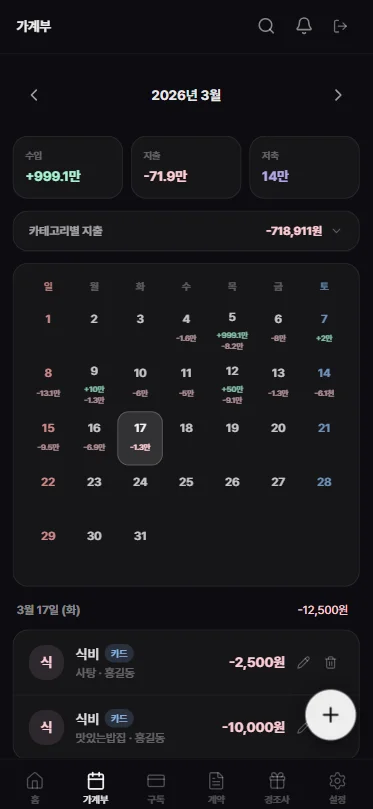
The calendar is organized to easily view income and expenses by date, and tapping on a date shows the transaction list for that date.
There was an issue when fetching dates from MySQL where the datetime type comes in JS as T00:00:00...
// MySQL datetime → YYYY-MM-DD parsing
  const d = typeof t.date === 'string'
    ? t.date.split('T')[0]
    : new Date(t.date).toISOString().split('T')[0]
// MySQL datetime → YYYY-MM-DD parsing
const d = typeof t.date === 'string'
? t.date.split('T')[0]
: new Date(t.date).toISOString().split('T')[0]Recurring Transactions
Fixed monthly expenses (meeting fees, savings, etc.) are registered as templates and automatically generate transactions for the corresponding date via a cron job at 1 AM every day.
To prevent duplicates, weekly checks are done with YEARWEEK() and monthly checks with DATE_FORMAT('%Y-%m') to see if they have already been created.OpenAI OCR Receipt Scanning
When a receipt is photographed with the camera, the amount, date, and items are recognized through the OpenAI API and automatically filled in the registration form. ※ Mobile app payment screenshots are also possible, not just receiptsPush Notifications
Using Web Push API + VAPID keys, notifications are sent for subscription payment dates, contract expirations, and family transaction registrations. Push notifications are possible after adding to the home screen on iOS, which is why a separate banner was created to encourage PWA installation.Fixed Expense Dashboard
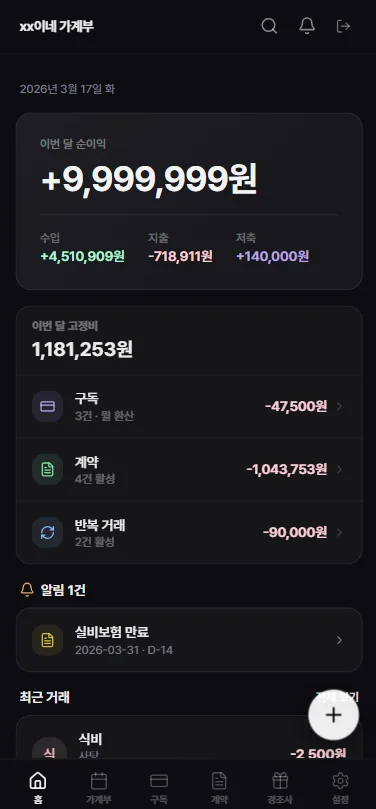
Subscriptions, contracts, and recurring transactions are aggregated, displaying the total fixed costs for this month on the home screen. It allows us to see at a glance how serious our household's fixed expenses are, even just for breathing.
In Conclusion
This project was carried out with AI from planning to deployment. It allowed for rapid work not only in writing code but also in exchanging opinions on design, debugging, and desired additional features.
Through this project, I focused more on user experience and usability than just implementing simple features.
In the next article, I plan to summarize the CI/CD configuration process using GitHub Actions.
This project is currently being serviced at https://home.jikwang.net, and I plan to share the code on GitHub as soon as it is ready.